
Searching Cases by Name
Craven runs on eCourts, so the public path starts at the North Carolina eCourts Portal. Smart Search takes a party name or case number. It then opens an eligible public Case Summary, also called the Register of Actions. You can search and read without registering. An account only helps frequent users track a My Cases folder, and elevated verified access is a separate role. Neither unlocks sealed or confidential material.
- Open Portal and select Smart Search rather than beginning with the separate Party Name filter.
- Enter the party name or other available search criterion, then submit the search.
- Use the available location, case type, status, date-of-birth, and filing-date filters to narrow a broad result to Craven.
- Open the matching result and compare its parties, case information, and events before relying on the Case Summary.
| Smart Search field or control | Type | Required | Options or format notes |
|---|---|---|---|
| Smart Search query | Text | One criterion | Enter a case number or party name. Smart Search is the documented default. |
| Advanced Filtering Options | Expandable control | No | Opens General Options, Party Search Criteria, and Case Search Criteria. |
| Filter by Search Type | Dropdown | No | Smart Search, Party Name, and Business Name are documented options. |
| Location | Dropdown or filter | No | Use Craven to narrow a county-specific result. |
| Party Name | Text filter | No | Can narrow broad Smart Search results; the system is party-based. |
| Date of Birth or range | Date filter | No | A specific date or range can narrow results; public display is masked or year-limited where recorded. |
| Case Type | Dropdown or filter | No | Documented groupings include Civil Actions, nonconfidential Special Proceedings, Estates, and Criminal Actions. |
| Case Status | Dropdown or filter | No | Available in Case Search Criteria; the live option list can change. |
| Case Filing Date Range | Date range | No | Narrows a search by filing window. |
| Search or Submit | Button | Yes | Runs the query using Portal's current vendor controls. |
| Case result or Case Summary | Result link | Not applicable | Opens available Case Summary or Register of Actions information. |
Craven County Case Search Methods
The Portal carries a statewide name. Yet its results can be narrowed to Craven County alone. Think of the tools in pairs. Smart Search pulls case history. Search Hearings shows a current court date, and NC Judgment Search works as an index route. A payment tool, by contrast, is not a case lookup. For an official copy or a certified court record, go to the Craven County Clerk of Superior Court.
Searching by Case Number
For a Craven County case search, nothing beats a complete Enterprise Justice file number. It has four parts. There is a two-digit year, a letter marking the case type, a six-digit sequence, and a three-digit county identifier. The Judicial Branch offers 21CR000003-910 as its example. Copy all of it, dash and county code included. Trim the number and you risk pulling the wrong case from the docket. One caveat applies. That number identifies a case. But only the clerk can hand you an official certified record.
Craven County Case Number Wildcards
A wildcard earns its keep. It helps when part of a name or file number is a mystery. In Portal, type at least four characters of the file number, then add *. Searching a person? Give three last-name characters plus one first-name character, asterisk at the end. When a business name holds a comma, swap a wildcard into that spot. Stop there. Wildcards widen the net, so narrow the catch. Filter by Craven County, case type, status, or filing date. If Portal stumbles, official guidance says to try Chrome or Edge. Use a cleared cache or a private window.
What a Case Search Returns
Open an eligible Craven County result. You get a Case Summary or Register of Actions, not a scanned docket book. Only sections that exist will display. Start with the case number and the parties. Then move to Case Events and any current Hearings. A missing financial or document block proves nothing; it does not mean the case history is empty.
| Case Number | Four-part Enterprise Justice identifier, such as 21CR000003-910, with year, type, sequence, and county identifier. |
|---|---|
| Case Information | Header-level case type, status, filing information, and other available core facts. |
| Assignment Information | Assigned court, courtroom, or judicial assignment when the data is available. |
| Party Information | People or entities and their roles in the party-based record. |
| Causes of Action | Legal claim categories for applicable civil, family, probate, or mental-health matters. |
| Case Events | Chronological docketable actions, including filings, service returns, orders, and hearing-related changes. |
| Hearings | Scheduled court events where hearing information is available; Search Hearings can return current location and time. |
| Dispositions | Outcome or status entries where applicable, distinct from a mere setting or filing. |
| Financial Information | Applicable monetary data when available; it does not establish online-payment eligibility. |
| Documents | Public documents may be available. Sealed or confidential items do not appear to ordinary public users. |
Craven County Case Summary Details
Every Case Event you see in the Portal is a line in the docket's chronological register. It is not always the paper underneath. A warrant, order for arrest, or criminal summons shows up here. That entry appears when it is issued, served, left unserved, reset to unserved, or recalled. So one glance is not enough. Check the event date and the event name. Check any newer hearing too, before you assume an entry reflects where the Craven County case stands today.
When public documents are attached, the Portal makes you download them one at a time. Error Code 141011 usually means the file is too large. The clerk can break it into smaller segments for you. For a certified copy, the clerk's copy and certification process is the official route to the court record.
Statewide vs County Case Search
Craven County has no case-search database of its own with a county brand on it. Instead, eligible Craven Case Summaries live in the North Carolina eCourts Portal, the statewide public system. To get county-specific, filter the Portal to Craven and work from there. Need a complete file or a certification? Turn to the Craven clerk's terminal and its file-and-copy process. The two channels do different jobs. Together they cover the full ground of a Craven County docket search.
| Statewide eCourts Portal | Craven County clerk route |
|---|---|
| Searches eligible public cases in eCourts counties and can be narrowed by Location to Craven. | Holds the county case file for inspection, official copies, and certifications. |
| Returns available Case Summary, Register of Actions, hearing, judgment-index, and some public-document information. | Provides a self-service terminal and the paper or electronic file held in the county where the case is located. |
| Best for a remote name or full-file-number search and current public case information. | Best for an incomplete, older, unclear, or online-unavailable record and for an authenticated copy. |
Craven County Judgment Search
NC Judgment Search is the right tool when you want a public judgment-index result. You can search it by party name or case number. Filters let you narrow by case type, status, location, and judgment date. That speeds up any Craven County docket search. Each result lists the case number and disposition status. You also get the index date and time, the parties, and any judgment comments that matter.
Remember what the index is not. It is not a full case history. For Case Events and Hearings as they become available, switch over to Smart Search instead.
Craven County Case Search No Matches
A no-match result does not prove the court matter is absent. It may just mean the query is off. Recheck the complete case number. Check the dash, the county identifier, the spelling, and your wildcard format too. Then refine Smart Search with Craven, case type, status, or filing date. Older converted event timestamps can mislead without context, so weigh them carefully.
Still nothing? The case may predate the online system. It may sit outside Craven, or simply be unclear on the screen. Visit the clerk terminal or the file room at 302 Broad Street, New Bern. You can also call 252-639-3000 for routing help. If you need a current setting, the Craven court calendar route checks Portal hearing data against a dated PDF.
Access and Restricted Cases
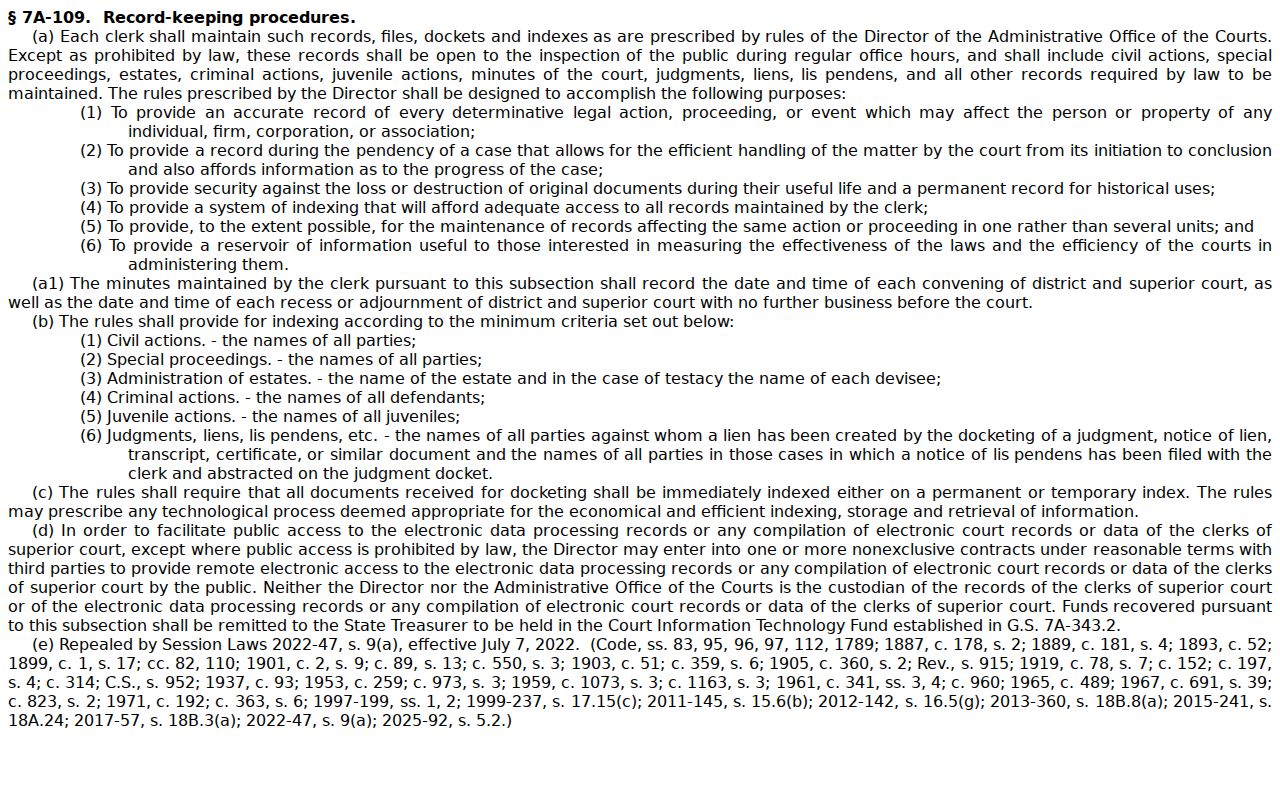
G.S. 7A-109 makes most of what the clerk keeps open to anyone who asks. Dockets, indexes, court files, and records are all inspectable unless a law blocks access. So send your Craven County court-file request straight to the clerk of court. The county public-information office is the wrong door. The Portal helps, but it is not the official record.
Some things stay hidden. Sealed files, confidential data, and restricted documents never show up for ordinary Portal users, and juvenile records are closed under G.S. 7B-300. Unreturned warrants and protective-order papers are two more examples. A docket search that comes back empty might mean the case is sealed or expunged. Public search does not override those limits.
Craven County Clerk Terminal Access
Everything for a Craven County court docket runs through one office. The Clerk of Superior Court keeps the files and docket indexes for both Superior Court and District Court. So a case lookup starts there in person. Ask the staff at the counter to use the public self-service terminal. You can also pull a county file by its full case number and read it on the spot. The Craven court location hub is the official starting point. State guidance confirms a case file may be viewed where it is located.
Wondering what gives the clerk this job? The North Carolina clerk record and docket duty statute lays out the duty. It puts these court records in the clerk's hands.
Need a clerk to pull a specific Craven County file? Use the civil, criminal District, or criminal Superior division line. That way the request lands in the right hands. For a written request that is not urgent, include the full case number and the parties. Add the record you want and a way to reach you. The NCAOC administrative-record process is a different channel, not the route for Craven case files.
Craven County Case History Timestamps
Craven County joined eCourts on February 3, 2025, in the coastal Track 7 rollout. Portal is the public search system. Filing is separate: North Carolina eCourts File & Serve takes document submission and shows filing status.
One quirk to expect in case history. Case Events converted before go-live can display a 12:00 AM timestamp, which is an artifact of conversion, not proof of a midnight court event.
Craven County State and Federal Cases
A Craven state-court search will not reach federal records. State criminal, civil, and traffic matters live in the eCourts Case Summary and the Craven clerk route. Federal cases are different. They run on the Eastern District of North Carolina's CM/ECF docket system, out of a separate New Bern federal office, with its own case-number format. A party's Craven residence changes nothing. Know which system you need before you search. The Eastern District of North Carolina CM/ECF CourtInfo page is the official source for that separate federal court-information system.
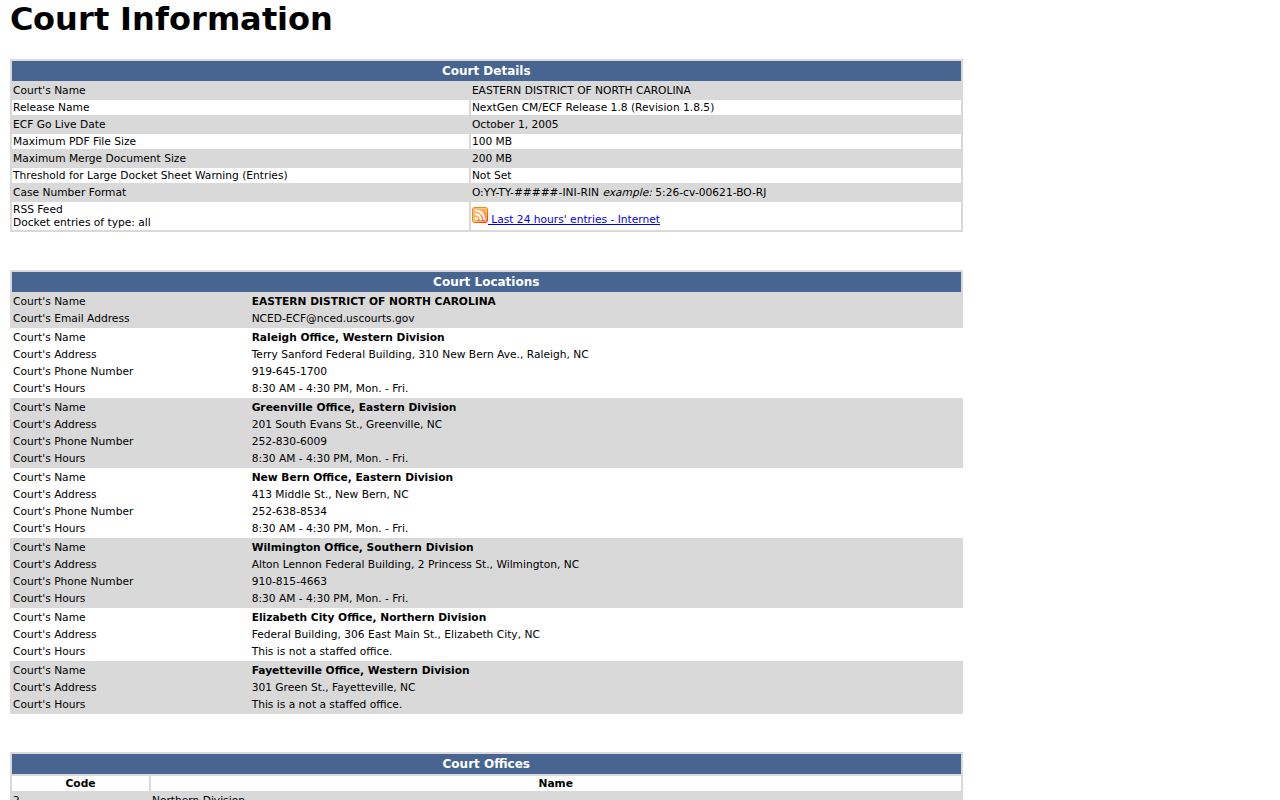
State court? Portal and the Craven clerk will get you a Case Summary or the file itself. Federal access instead follows CM/ECF and PACER rules.